Second Monitor Dashboard
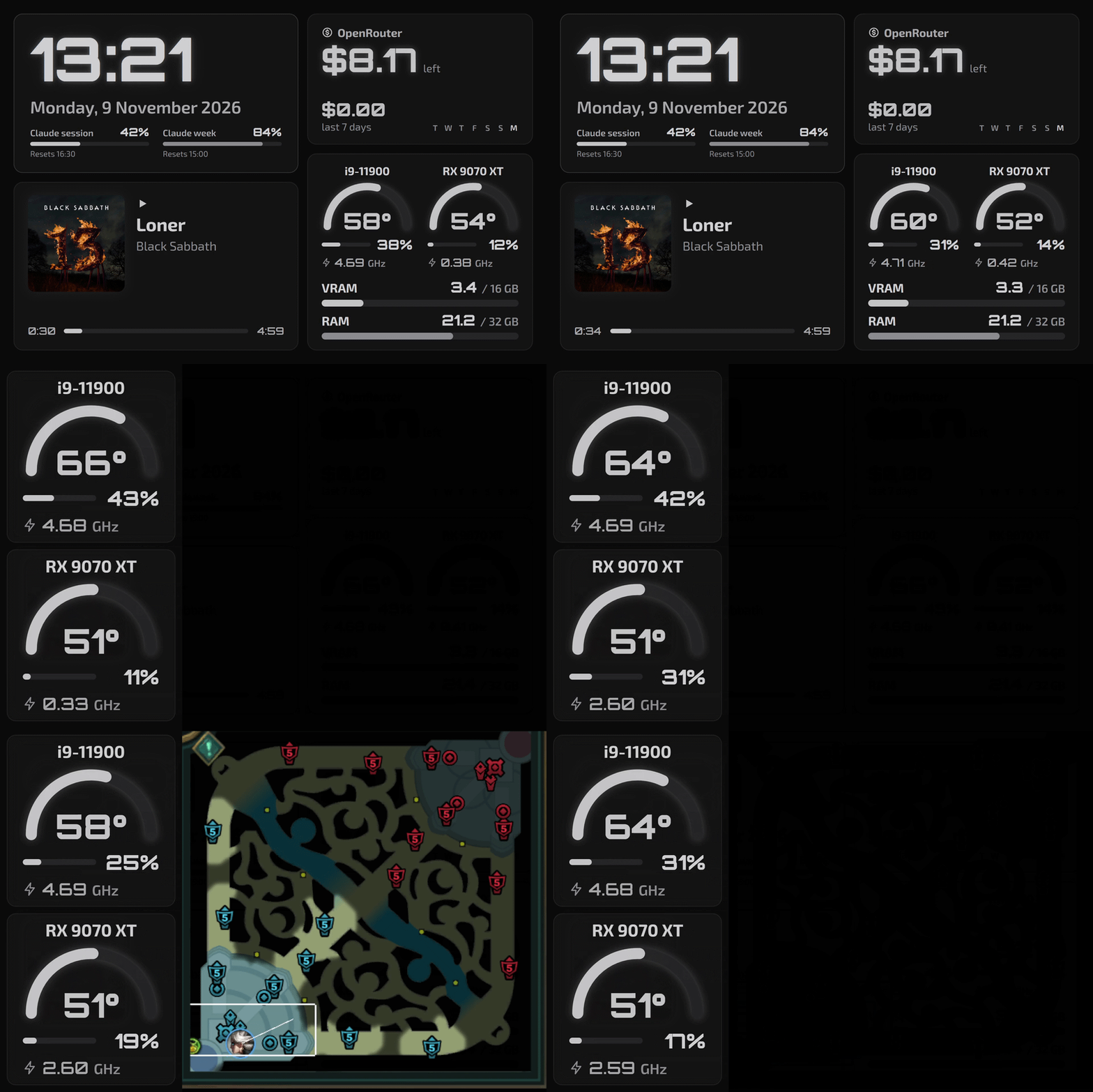
A live dashboard on a small 10.5" second monitor showing my AI credits, Claude usage, PC temperatures, now playing and the clock, and it switches to a League of Legends minimap view on its own when I start a game.
- Dashboard
- Automation
- Homelab
Problem
The numbers I check most during the day live in different places: how many OpenRouter credits I have left and how fast I'm spending them, how close I am to my Claude limits, how hot my CPU and GPU are running, and what's playing. Checking any of them meant alt-tabbing away from what I was doing. I wanted all of it on one small screen next to my main monitors, where a glance is enough.
What I built
A full-screen web page made for a 10.5" 1920×1280 monitor, shown through OBS Studio's projector, with a small Python server on my PC collecting the data behind it. I designed the look first in Claude Design: dark grey and white, Orbitron and Exo 2 fonts, rounded panels and arc gauges, with colour kept for album art and for gauges that turn orange or red when the CPU or GPU runs hot. Then I built it with Claude Code in six phases: the page, live PC stats, music, OpenRouter, OBS scene switching, and starting everything at login. What's on it: - Clock and date, Sofia time, 24-hour. - OpenRouter credits left and spend over the last 7 days. The server checks every 5 minutes with a read-only management key and saves a daily snapshot, so it can work out the weekly figure itself. - Claude session and weekly usage bars, with their reset times, checked every 5 minutes. - Now playing: song, artist, album art and a progress bar read from Windows' own media controls, so no Spotify developer account is needed. Updates every second. - PC stats for the i9-11900 and RX 9070 XT: temperature, usage and clock speed on arc gauges, plus VRAM and RAM bars. Read from LibreHardwareMonitor every 2 seconds. When League of Legends starts, the server tells OBS over its WebSocket connection to switch scenes. The monitor then shows the in-game minimap on the right, with the CPU and GPU gauges on the left. It switches back when the game closes. Keys and passwords stay in a local .env file and never reach the page. Fonts are bundled, so it works offline. If one data source goes down, only that widget shows a dash and the rest keeps working. At login, LibreHardwareMonitor, the server and OBS start in the right order with no windows to manage. The server only uses Python's built-in tools plus one package for the media controls, and it has around 90 automated tests behind it.
Tech used
- Python
- HTML/CSS/JavaScript
- OBS Studio
- OBS WebSocket
- LibreHardwareMonitor
- Windows Media Controls
- OpenRouter API
- Claude Design
- Claude Code
Result
It runs all day on the small monitor and starts by itself with the PC. I measured the whole setup at under 1% CPU, about 590 MB of RAM and about 700 MB of VRAM, so I don't feel it even while gaming. Credits, limits and temperatures are now always in view without leaving what I'm doing.